

What Visit Japan Web Covers
Visit Japan Web is operated by Japan’s Digital Agency. It is a browser-based service rather than an app you need to install, and you can use it on a computer, tablet, or smartphone.
For an international visitor, the service brings the main arrival tasks into one place:
- Personal and passport information
- Your arrival date, flight, and accommodation details
- Information required for immigration clearance
- An electronic customs declaration
- Optional tax-free shopping functions, when applicable
For foreign visitors who complete the immigration and customs information, Visit Japan Web provides one combined QR code for both arrival procedures. You do not need separate immigration and customs QR codes.
Open the official Visit Japan Web service
Visit Japan Web is free and works in a browser. Use the official vjw.digital.go.jp address rather than installing an unofficial app.
Do You Need to Use Visit Japan Web?
Visit Japan Web is optional. It is not a visa, does not replace any visa you may need, and does not determine whether you are eligible to enter Japan. Check your entry requirements separately before traveling.
If you choose not to use it, follow the alternative immigration and customs procedures available on arrival. For most international visitors, however, registering before departure is the easier option because you can review the information calmly and have the QR code ready before reaching immigration and customs.
Before You Start
Have the following details ready before you begin:
- Your passport
- Your arrival date, airline, and flight number
- The name and address of your accommodation in Japan
- An email address you can access
- An internet-connected smartphone, tablet, or computer
If you are registering accompanying family members, have their passports and travel details available as well. If your arrival flight or accommodation changes after registration, return to the trip record and update the affected information before you travel.
Step-by-Step Registration Guide
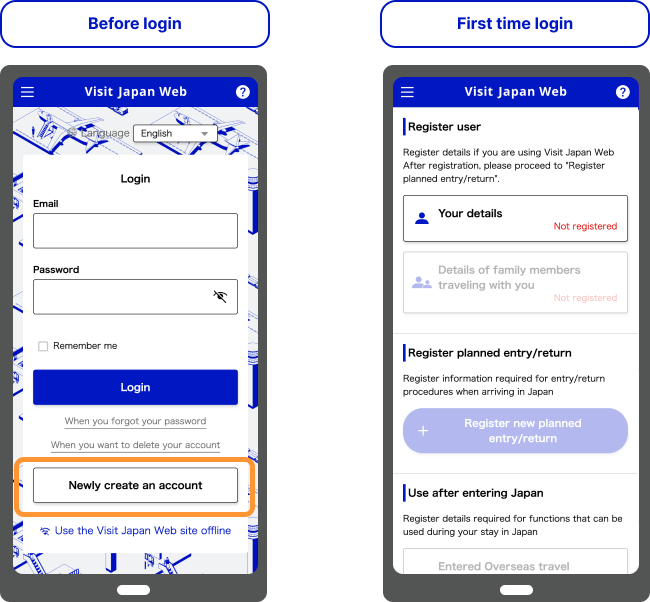
Create a Visit Japan Web account with an email address and password, then use the verification email to complete the setup. Once the account is ready, sign in and begin registering your information.
Do this before your departure day if possible. You will have more time to check your passport, flight, and accommodation details if anything needs correcting.
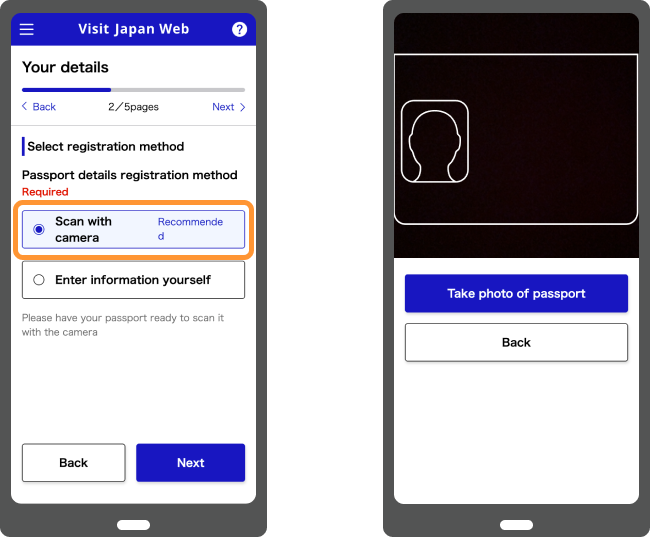
Register your personal and passport information. Check that your name, passport number, nationality, date of birth, and other details match your passport exactly.
Visit Japan Web can use your smartphone camera to scan passport information. If you enter information manually, check every field before moving on.
Some registered information can be reused on a future trip, but you should still confirm that your passport and travel details are current each time you visit Japan.
Create a record for your upcoming trip to Japan. You will be asked for information such as your arrival date, airline or flight details, and accommodation in Japan. Use the details for this itinerary rather than relying on information saved from an earlier trip.
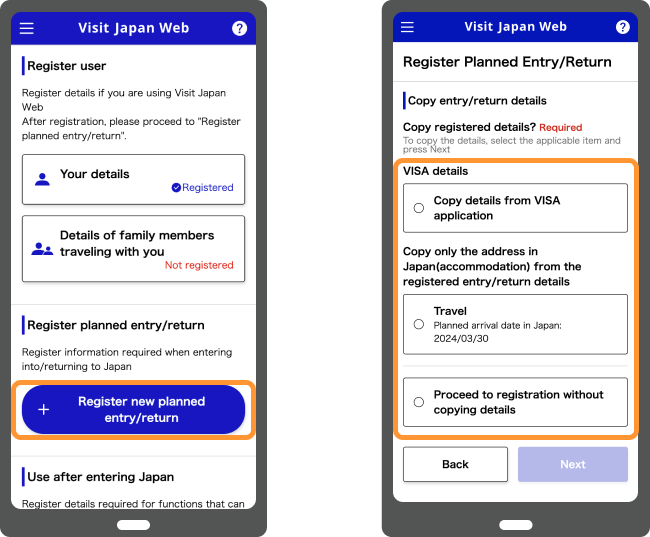
After registering your trip, open its entry/return procedure page and complete the sections that apply to you.
Immigration: Foreign visitors enter the information required for immigration clearance, including the details requested on the foreigner entry record.
Customs declaration: Answer each question according to what you are actually bringing into Japan, including any prohibited or restricted items, commercial goods, or items and currency that must be declared.
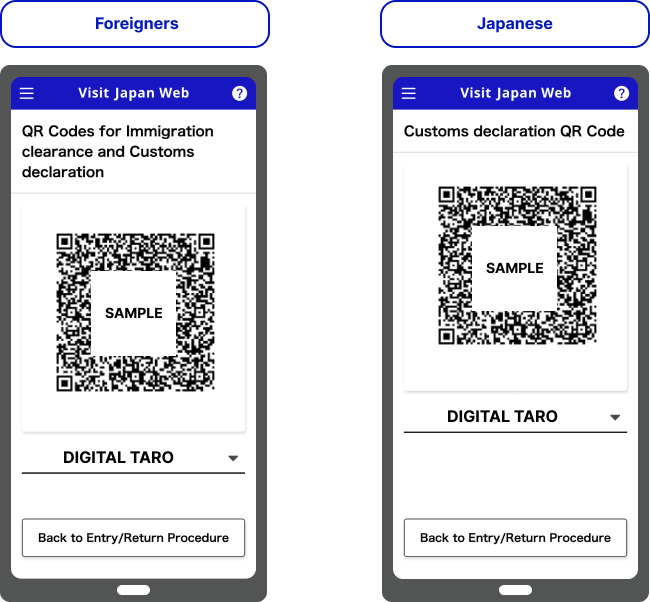
For foreign visitors completing both procedures, Visit Japan Web now displays a combined QR code for immigration clearance and customs declaration.
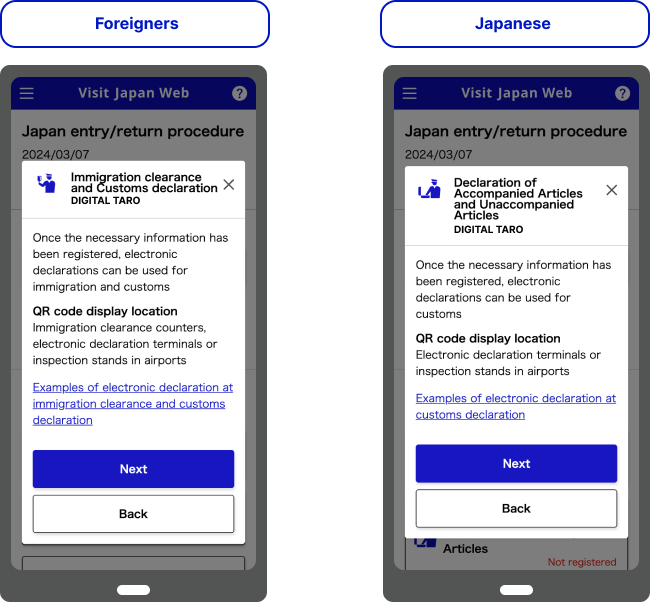
After arriving in Japan, open the entry/return procedure for your trip and display the QR code when instructed. Foreign visitors can use the same combined code for immigration clearance and again at the customs electronic declaration terminal or inspection desk. Follow the signs and staff instructions, as the equipment and route can vary by airport.
Using Visit Japan Web for Tax-Free Shopping
The tax-free functions are optional and separate from the immigration and customs procedure used on arrival. They matter only if you are eligible for tax-free shopping and choose to use the service.
Using the Tax-Free QR Code in Stores
The Visit Japan Web tax-free QR code is currently available to eligible foreign nationals with Temporary Visitor, Diplomat, or Official status. To create it, scan your passport when registering your personal information, then scan the landing permission in your passport after entering Japan.
At a store that accepts Visit Japan Web tax-free QR codes, open the live code and show it to the staff so they can retrieve the information required for the purchase procedure. Screenshots of the tax-free QR code cannot be used.
Not every tax-free shop supports this function. Check with the store before relying on the QR code, and keep your passport available in case the standard procedure is required.
From November 1, 2026: Tax-Free Refund Procedures When Leaving Japan
Japan’s tax-free shopping system changes for purchases made on or after November 1, 2026. Under the new refund method, eligible travelers pay the tax-inclusive price at the store. The amount equivalent to the consumption tax is refunded after the required customs procedure confirms that the goods are being taken out of Japan.
At Narita, Haneda, Kansai, Chubu, New Chitose, Fukuoka, and Naha airports, travelers will also be able to complete this step through Visit Japan Web within designated areas of the international departure lobby after connecting to the dedicated Wi-Fi for the procedure.
This departure procedure is separate from the immigration and customs QR code used when entering Japan.
Complete the departure tax-free procedure before checking in your luggage. Keep all tax-free goods with you until the procedure is finished because customs may require an inspection.
The airport process and refund rules are different from the ordinary arrival procedure, so check the latest official instructions before departing Japan. For eligibility, purchase conditions, and the complete departure flow, see Tax-Free Shopping in Japan: Rules, Purchases & Refunds.
Final Check Before Your Flight
Open Visit Japan Web on the device you plan to carry and confirm the following before departure:
- You are using the official Visit Japan Web website.
- Your name and passport details match the passport exactly.
- The correct trip is selected and its arrival information is complete.
- Your arrival flight and accommodation details are current.
- Each accompanying family member’s information has been completed, if applicable.
- You can sign in and display the QR code for the correct traveler.
- Your phone has enough battery and you have a way to connect to the internet.
If you cannot use the service when you arrive, follow the airport signs and staff instructions for the alternative procedure.
Official Information
- Visit Japan Web
- Digital Agency: How to Use Visit Japan Web
- Japan Customs: Electronic Customs Declaration
- Japan Tourism Agency: Tax-Free Shopping Refund Method for Travelers
Last verified: September 13, 2026 (JST)
Visit Japan Web screens, supported procedures, and tax-free functions may change. Check the official service again before traveling.
Frequently Asked Questions
- Is Visit Japan Web mandatory?
-
No. Visit Japan Web is optional and is not a visa or entry authorization. If you do not use it, follow the alternative immigration and customs procedures on arrival. Japan Customs continues to accept a paper customs declaration.
- Can I register after arriving in Japan?
-
You can access the service in Japan if you have an internet connection, but completing the arrival information before your flight is usually more practical. It gives you time to correct mistakes and prepare the QR code before reaching immigration and customs.
- Do I need separate QR codes for immigration and customs?
-
No. Foreign visitors who complete both sets of information receive one combined QR code for immigration clearance and customs declaration. Open the entry/return procedure for the correct trip and follow the instructions at the airport.
- Do children need to be registered?
-
Yes. Children need the appropriate arrival information completed. Accompanying family members who go through the procedures with you can be registered under the same account, but each person’s details must be entered and the correct traveler selected when displaying a QR code.
- What if my hotel or flight changes?
-
Open the registered trip and update the affected fields before arrival. After making a change, check the immigration and customs information again and confirm that the QR code can still be displayed.
- Can I use Visit Japan Web for tax-free shopping?
-
Eligible foreign visitors can create a tax-free QR code and use it at participating stores. Open the live code because screenshots cannot be used. For purchases made on or after November 1, 2026, Visit Japan Web will also support part of the departure procedure at seven major airports.
- Is Visit Japan Web available in English?
-
Yes. Visit Japan Web and its official guidance are available in English as well as several other languages.